kafka安装步骤(单机或集群)(版本scala2.12-3.2.1)
官网:http://kafka.apache.org/各个版本下载地址:http://kafka.apache.org/downloads官网下载地址:https://mirror.bit.edu.cn/apache/kafka/3.2.1/kafka_2.12-3.2.1.tgz腾讯资源库(这个下载速度飞快)https://mirrors.cloud.tencent.com/apache/kaf
文章目录
1、kafka安装
1.1、 步骤
官网:http://kafka.apache.org/
各个版本下载地址:http://kafka.apache.org/downloads
官网下载地址:https://mirror.bit.edu.cn/apache/kafka/3.2.1/kafka_2.12-3.2.1.tgz
腾讯资源库(这个下载速度飞快)https://mirrors.cloud.tencent.com/apache/kafka安装环境:
服务器系统:CentOS 7.9
kafka版本:kafka_2.12-3.2.1 当前最新稳定版
zookeeper版本:apache-zookeeper-3.7.1-bin.tar.gz
zookeeper安装步骤可以参考我发的这个:https://blog.csdn.net/ly8951677/article/details/106605390
jdk版:1.8.0_144
-
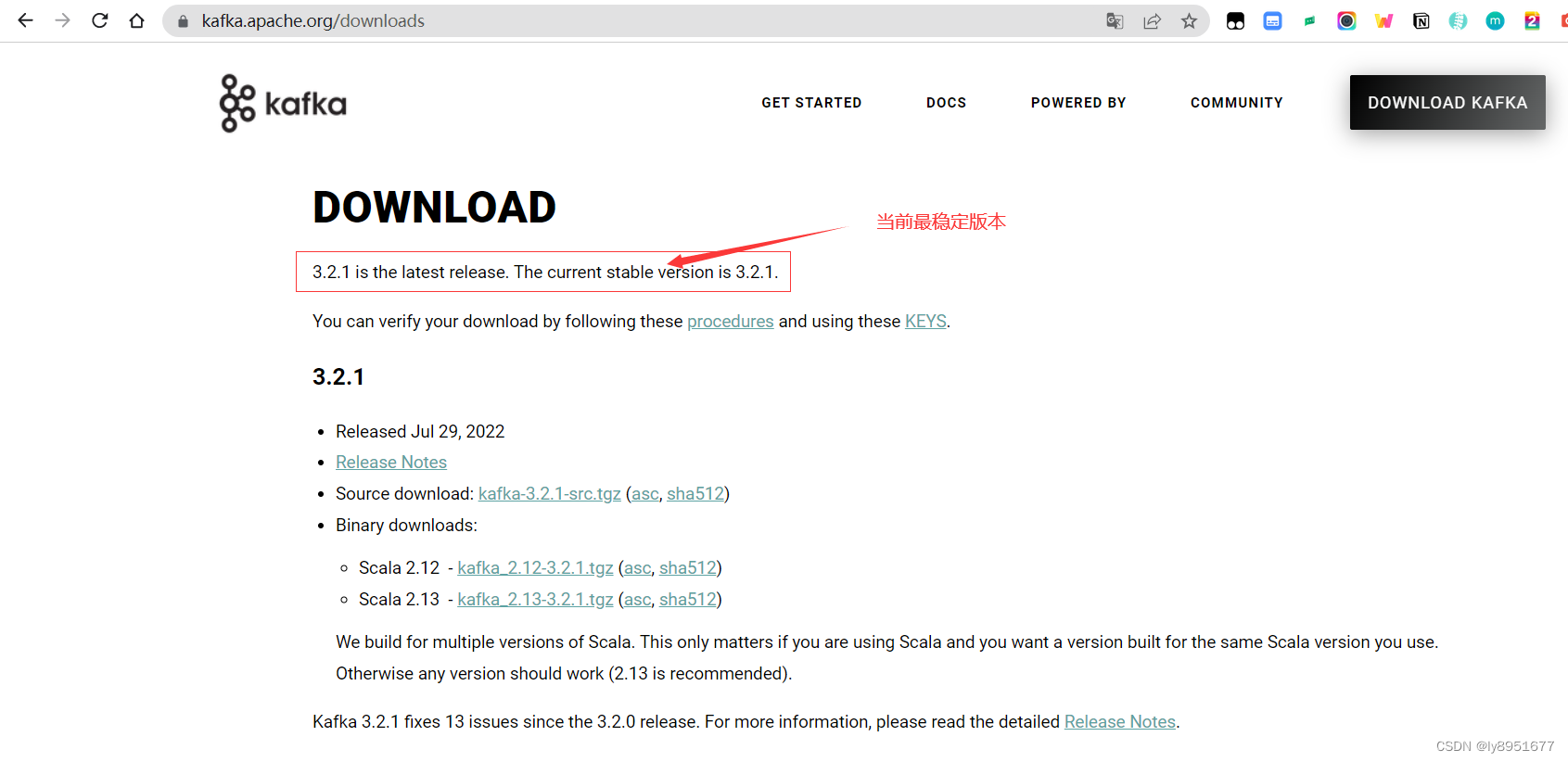
进入官网
-
选择版本
当前版本:kafka_2.12-3.2.1.tgz
-
上传到服务器,然后进行解压
cd /data/software/ tar -zxvf kafka_2.12-3.2.1.tgz mv kafka_2.12-3.2.1 kafka mv kafka /data/program/ -
修改server.xml
cd /data/program/kafka/config
mkdir -p /data/kafka/logs
vim server.xml
server.xml修改的地方
broker.id=0
#实际存的是暂存数据,不单单是log日志。
log.dirs=/data/kafka/logs
#要是重新部署kafka,这个路径最好删除,重新建立空文件夹。最少都要logs/meta.properties
#不要kafka自带的,我们用我们自己安装的
zookeeper.connect=slave01:12181,slave02:12181,slave03:12181
若是要安装集群,整个复制目录过去。只需修改另外两台机子的server.properties文件这两个地方。
第二台机子
 broker.id=1
 listeners=PLAINTEXT://IPTVBI_03:19092
第三台机子
 broker.id=2
 listeners=PLAINTEXT://IPTVBI_05:19092
server.properties修改后
# Licensed to the Apache Software Foundation (ASF) under one or more
# contributor license agreements.  See the NOTICE file distributed with
# this work for additional information regarding copyright ownership.
# The ASF licenses this file to You under the Apache License, Version 2.0
# (the "License"); you may not use this file except in compliance with
# the License.  You may obtain a copy of the License at
#
#    http://www.apache.org/licenses/LICENSE-2.0
#
# Unless required by applicable law or agreed to in writing, software
# distributed under the License is distributed on an "AS IS" BASIS,
# WITHOUT WARRANTIES OR CONDITIONS OF ANY KIND, either express or implied.
# See the License for the specific language governing permissions and
# limitations under the License.

# see kafka.server.KafkaConfig for additional details and defaults

############################# Server Basics #############################

# The id of the broker. This must be set to a unique integer for each broker.
#broker相当于一台服务器,也就是一个kafka进程。所以只能是整数,集群,每个都要改,比如:0,1,2
broker.id=0

############################# Socket Server Settings #############################

# The address the socket server listens on. It will get the value returned from
# java.net.InetAddress.getCanonicalHostName() if not configured.
#   FORMAT:
#     listeners = listener_name://host_name:port
#   EXAMPLE:
#     listeners = PLAINTEXT://your.host.name:9092
#listeners=PLAINTEXT://:9092
#更改了端口
listeners=PLAINTEXT://hostname_02:29092
# Hostname and port the broker will advertise to producers and consumers. If not set,
# it uses the value for "listeners" if configured.  Otherwise, it will use the value
# returned from java.net.InetAddress.getCanonicalHostName().
#advertised.listeners=PLAINTEXT://your.host.name:9092

# Maps listener names to security protocols, the default is for them to be the same. See the config documentation for more details
#listener.security.protocol.map=PLAINTEXT:PLAINTEXT,SSL:SSL,SASL_PLAINTEXT:SASL_PLAINTEXT,SASL_SSL:SASL_SSL

# The number of threads that the server uses for receiving requests from the network and sending responses to the network
num.network.threads=3

# The number of threads that the server uses for processing requests, which may include disk I/O
num.io.threads=8

# The send buffer (SO_SNDBUF) used by the socket server
socket.send.buffer.bytes=102400

# The receive buffer (SO_RCVBUF) used by the socket server
socket.receive.buffer.bytes=102400

# The maximum size of a request that the socket server will accept (protection against OOM)
socket.request.max.bytes=104857600


############################# Log Basics #############################

# A comma separated list of directories under which to store log files
#log.dirs=/tmp/kafka-logs
#实际存的是暂存数据,不单单是log日志。
log.dirs=/data/kafka/logs

# The default number of log partitions per topic. More partitions allow greater
# parallelism for consumption, but this will also result in more files across
# the brokers.
num.partitions=1

# The number of threads per data directory to be used for log recovery at startup and flushing at shutdown.
# This value is recommended to be increased for installations with data dirs located in RAID array.
num.recovery.threads.per.data.dir=1

############################# Internal Topic Settings  #############################
# The replication factor for the group metadata internal topics "__consumer_offsets" and "__transaction_state"
# For anything other than development testing, a value greater than 1 is recommended to ensure availability such as 3.
offsets.topic.replication.factor=1
transaction.state.log.replication.factor=1
transaction.state.log.min.isr=1

############################# Log Flush Policy #############################

# Messages are immediately written to the filesystem but by default we only fsync() to sync
# the OS cache lazily. The following configurations control the flush of data to disk.
# There are a few important trade-offs here:
#    1. Durability: Unflushed data may be lost if you are not using replication.
#    2. Latency: Very large flush intervals may lead to latency spikes when the flush does occur as there will be a lot of data to flush.
#    3. Throughput: The flush is generally the most expensive operation, and a small flush interval may lead to excessive seeks.
# The settings below allow one to configure the flush policy to flush data after a period of time or
# every N messages (or both). This can be done globally and overridden on a per-topic basis.

# The number of messages to accept before forcing a flush of data to disk
#log.flush.interval.messages=10000

# The maximum amount of time a message can sit in a log before we force a flush
#log.flush.interval.ms=1000

############################# Log Retention Policy #############################

# The following configurations control the disposal of log segments. The policy can
# be set to delete segments after a period of time, or after a given size has accumulated.
# A segment will be deleted whenever *either* of these criteria are met. Deletion always happens
# from the end of the log.

# The minimum age of a log file to be eligible for deletion due to age
log.retention.hours=168

# A size-based retention policy for logs. Segments are pruned from the log unless the remaining
# segments drop below log.retention.bytes. Functions independently of log.retention.hours.
#log.retention.bytes=1073741824

# The maximum size of a log segment file. When this size is reached a new log segment will be created.
log.segment.bytes=1073741824

# The interval at which log segments are checked to see if they can be deleted according
# to the retention policies
log.retention.check.interval.ms=300000

############################# Zookeeper #############################

# Zookeeper connection string (see zookeeper docs for details).
# This is a comma separated host:port pairs, each corresponding to a zk
# server. e.g. "127.0.0.1:3000,127.0.0.1:3001,127.0.0.1:3002".
# You can also append an optional chroot string to the urls to specify the
# root directory for all kafka znodes.
#zookeeper.connect=localhost:2181
#不要kafka自带的,我们用我们自己安装的,我这里价格zookeeper指定路径kafka都在zookeeper某个路径下,
#搞得太乱就难看,而且若是有多个kafka,可以分隔开来,建立新的/kafka_two之类的
zookeeper.connect=slave01:12181,slave02:12181,slave03:12181/kafka


# Timeout in ms for connecting to zookeeper
zookeeper.connection.timeout.ms=18000


############################# Group Coordinator Settings #############################

# The following configuration specifies the time, in milliseconds, that the GroupCoordinator will delay the initial consumer rebalance.
# The rebalance will be further delayed by the value of group.initial.rebalance.delay.ms as new members join the group, up to a maximum of max.poll.interval.ms.
# The default value for this is 3 seconds.
# We override this to 0 here as it makes for a better out-of-the-box experience for development and testing.
# However, in production environments the default value of 3 seconds is more suitable as this will help to avoid unnecessary, and potentially expensive, rebalances during application startup.
group.initial.rebalance.delay.ms=0
-
启动
#-daemon 使用守护进程运行,若不加参数,启动后不能自动退出启动的窗口。可能也可以用nohup,我没试过,可以试试,应该可以。 /data/program/kafka/bin/kafka-server-start.sh -daemon /data/program/kafka/config/server.properties -
关闭
由于我的kafka安装路径自定义,所以关闭的时候找不到pid,导致执行关闭脚本失效,所以要修改下vim /data/program/kafka/bin/kafka-server-stop.sh#PIDS=$(ps ax | grep -i 'kafka\.Kafka' | grep java | grep -v grep | awk '{print $1}') #这里的jps使用ssh跨服务器调用的话会找不到这个命令,需要指定运行路径,比如我的jps在:/usr/java/jdk1.8.0_144/bin/jps #PIDS=$(/usr/java/jdk1.8.0_144/bin/jps |grep -i kafka|awk '{print$1}') PIDS=$(jps |grep -i kafka|awk '{print$1}')#执行关闭脚本 /data/program/kafka/bin/kafka-server-stop.sh
1.2、 脚本分发,启动
distribute.sh 温馨提示,服务器间,一定要配置免密
#!/bin/bash
##excute the shell: sh /data/script/install/distribute.sh kafka_distribute
#distribute software
service_ip_str=(hostname_03 hostname_05)
service_ip_str_all=(hostname_02 hostname_03 hostname_05)
kafkaPath=/data/program/kafka
logPath=/data/logs/kafka
case $1 in
"kafka_distribute"){
        for(( i=0;i<${#service_ip_str[@]};i++))
        do
                param=${service_ip_str[i]}
                ssh $param mkdir -p /data/kafka/logs
                myid=`expr $i + 1`
                scp -r ${kafkaPath} root@$param:/data/program/
                ssh $param sed -i s/broker.id=0/broker.id=$myid/g ${kafkaPath}/config/server.properties
        done
};;
"kafka_start"){
        for(( i=0;i<${#service_ip_str_all[@]};i++))
        do
                param=${service_ip_str_all[i]}
                echo "${param}"
                echo "${param}">>${logPath}/excuteInfo.log
                ssh ${param} "source /etc/profile;${kafkaPath}/bin/kafka-server-start.sh -daemon ${kafkaPath}/config/server.properties"
        done
};;
"kafka_stop"){
        for(( i=0;i<${#service_ip_str_all[@]};i++))
        do
                param=${service_ip_str_all[i]}
                echo "${param}"
                echo "${param}">>${logPath}/excuteInfo.log
                ssh ${param} "source /etc/profile;${kafkaPath}/bin/kafka-server-stop.sh"
        done
};;
esac
最好加source /etc/profile;要不有可能会报找不到java这个命令,还有本机也要设置免密访问

Kafka开源项目指南提供详尽教程,助开发者掌握其架构、配置和使用,实现高效数据流管理和实时处理。它高性能、可扩展,适合日志收集和实时数据处理,通过持久化保障数据安全,是企业大数据生态系统的核心。
更多推荐


 1
1 0
0- 0


 已为社区贡献1条内容

所有评论(0)